Mod


![]()
Luect (Luanti emoji, colors, and through-tags)
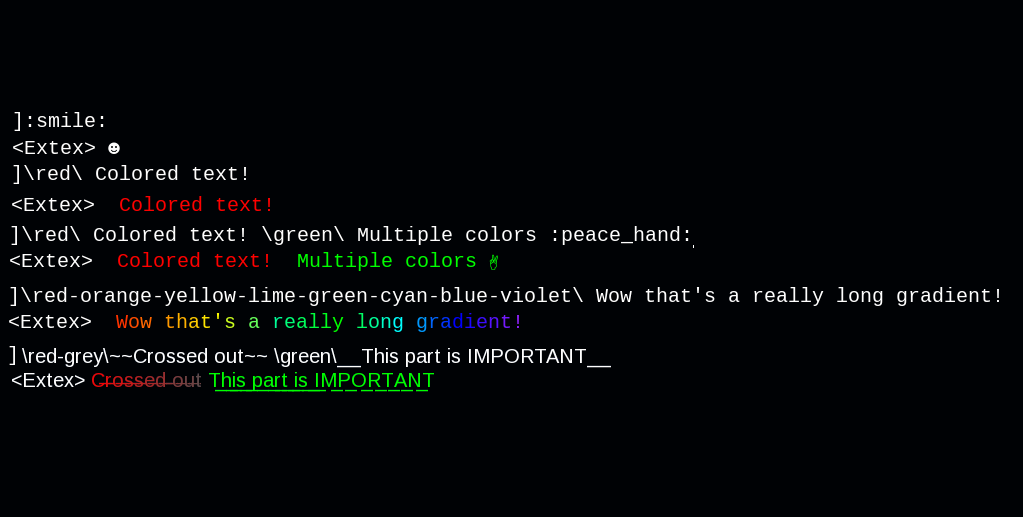
A simple markup language for coloring, underlining/strikethrough, and emoji/special character insertion.
LUECT (Luanti Emoji, Color, and Through tags)
Misc Functions
-
luect.lerp_colors(colors, t): returns interpolated hex code- Interpolates nbetween the given colors
colors: is a table list of colors:"#RRGGBB"or{r=0,g=0,b=0}t: percentage between 0-1
-
luect.gradient_colorize(colors, message): returns colorized string- Colorizes a message with a gradient by inserting color escape sequence before each character
colors: is a table of colors:"#RRGGBB"or{r=0,g=0,b=0}message: string to be colorized
-
luect.stress_test(stress): randomly generates a formatted string to test luect markup
Internal Markup Handlers
-
luect.tokenize_string(message): returns tokens- Turns a string into a token list.
message: string to be processed.- Returns token list with the string as the first token.
-
luect.tokenize_emoji(tokens): returns tokenstokens: Tokens to be processed.- Return list with emojis separated.
-
luect.tokenize_colors(tokens, settings): returns tokens, and error stringtokens: Tokens to be processed.settings: Markup settings.- Relavant properties:
settings.allow_hex: boolean for if hex codes are allowed. (default true)settings.gradient_limit: color limit for gradients. (default unlimited)
- Returns token list with color tags separated.
-
luect.tokenize_through_tags(tokens, original_message): returns tokenstokens: Tokens to be processed.original_message: (optional) original string. Used to skip unused tags.- Returns token list with through tags separated.
-
luect.split_tokens(tokens): returns tokens- Handles the splitting of strings inside of through tags/gradients prior to rendering.
tokens: Tokens to be processed.- Returns token list with strings slices separated.
-
luect.render_tokens(tokens, settings): returns rendered stringtokens: Tokens to be rendered.settings: Markup settings. Relavant properties:settings.skip_last_through: boolean for if the final through insertion should be skipped (default true)
Markup Handler
luect.handle_markup(message, settings): returns rendered string, and errors stringmessage: string to be processed.settings: see (Markup Settings)luect.handle_markup("\\red\\:triangle_up: WARNING: __LUECT__ HAS BEEN LOADED :triangle_up:")
Markup Settings
{
    -- Disable steps, stops the tag type from being processed, leaving it as plain text
    emoji = true,
    color = true,
    through = true,

    -- color settings
    allow_hex = false, -- default true
    gradient_limit = 8, -- default nil (unlimited)
    custom_colors = { -- Custom color tags passed to color tag handler
        col1 = "#RRGGBB",
        col2 = "#RRGGBB"
    },

    -- Through tag settings
    skip_last_through = true, -- Skip final insertion. Looks better on default Luanti font. default true
}
String Format
-
Emoji/Special Characters
- Character name with colon on either side
":smile:"gets replaced with"☻"- See
special_characters.mdfor complete list.
-
Color Tags:
- A color name wrapped in backslashes
"\\red\\"colors all following text red- Multiple color names separated by a hyphen make a gradient
"\\red-yellow\\"Colors text with a gradient between the tag until either the next color tag or the end of the string"\\red-orange-yellow-lime-green-cyan-blue-violet\\"Any number of colors can be used in a gradient.- The built in color presets are:
red,orange,yellow,green,lime,cyan,blue,purple,violet,pink,white,silver,grey,black
- You can also use hex codes:
"\\#ff00ff-#fac3ff\\ Custom color wow"- If you plan to use a color frequently, you can add it to
custom_colors(See Markup Settings)
-
Through Tags:
- Underlines and Strikethroughs
__Underlines__and~~Strikethoughs~~- Can be overlapped:
__Underlined and ~~crossed out__ cool~~
Links
- Source: https://github.com/Extex101/luect
- Issues: https://github.com/Extex101/luect/issues
- Original ContentDB page: content.luanti.org/packages/Extex/luect/
License
MIT
Development state
MAINTENANCE_ONLY
| Version | Date | Min engine | Size | Download |
|---|---|---|---|---|
| 1.1b | 2026-09-12 01:24:19 | 5.0 | 9.8 KB | Download |